
Mihon: Manga Comic Library
BAV STUDIOComics
0.00.00 Reviews
- Version
- 1.0.4
- Installs
- 10.00K
- Age Rating
- Everyone
Screenshots
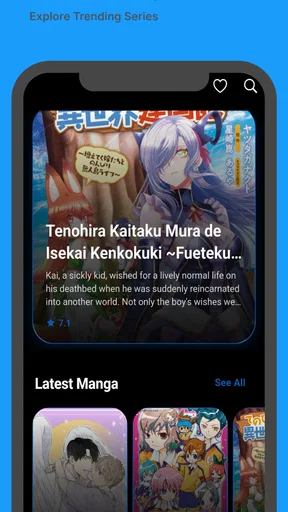
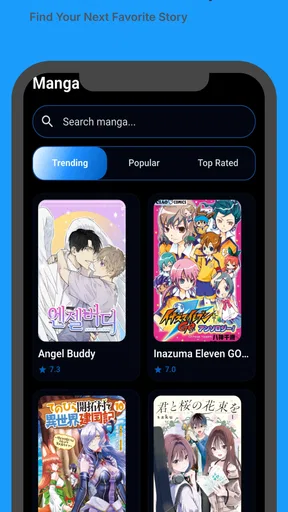
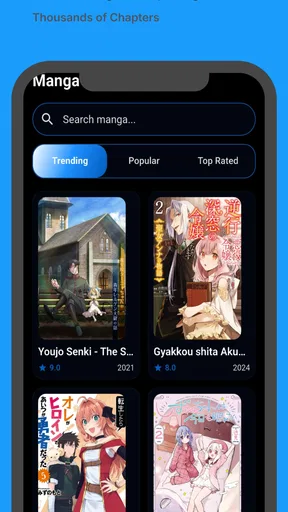
Our Review of Mihon: Manga Comic Library
 Analysis by Appyee
I approached Mihon: Manga Comic Library as a reader who wants one calm place for manga, comics, and longer stories instead of jumping between scattered reading lists. It is a free comics app from BAV STUDIO, aimed at Everyone, and its basic promise is easy to understand: discover new titles, keep track of what interests you, and organize a personal reading library.
That sounds simple, but a library app is only useful when its organization fits the way you actually read. In my experience, the important question is not whether Mihon can replace every comic service on your phone. It is whether you want a focused tool for browsing and managing reading material, and whether you are comfortable spending a little time making the app fit your habits.
The app is currently at version 1.0.4 and works on Android 7.0 or later. It has passed the early discovery stage with more than ten thousand installs, which gives it a small but real footprint without making it feel like an overcrowded mainstream platform. I would recommend looking at it as a practical library companion rather than as a complete substitute for every publisher, store, or subscription service.
Where I got stuck while trying to make the library useful
The first friction comes from expectations. When I open a comics app, I want to know immediately where to find something to read. Mihon presents itself around discovery and organization, so the useful experience depends on moving beyond the opening screen and building a reading space that reflects my interests. If I expected a fully populated catalog from the first launch, I could easily mistake an empty or lightly organized view for a problem.
That distinction matters. A library is not the same thing as a storefront. A storefront usually pushes featured titles, paid editions, and publisher collections. A reading library is more personal: it becomes valuable after I decide what belongs there. Mihon makes more sense when I treat the first session as setup time rather than as a finished recommendation feed.
I also found that broad labels can hide different reading intentions. “Manga,” “comics,” and “stories” are not interchangeable for every reader. Someone looking for a particular licensed edition may care about publisher availability, language, or release timing. Someone else may simply want a place to remember several series and return to them later. Mihon is more appealing to the second group, especially readers who dislike losing track of titles across multiple apps.
One useful habit is to separate discovery from commitment. I would not add every interesting title immediately. Instead, I would first decide whether a title is something I genuinely plan to read, something I am only researching, or something I want to revisit later. Keeping those intentions separate prevents the library from becoming a crowded pile of temporary choices.
This is one of the app’s less obvious trade-offs: organization takes attention. The reward is a cleaner reading routine, but the cost is that I have to make small decisions instead of relying entirely on an algorithmic home screen. Readers who enjoy curating their own lists may find that satisfying. Readers who want instant, highly personalized recommendations may prefer a large commercial comics platform.
What I would check before blaming the app
When a title seems unavailable, I would first check whether I am searching in the right part of the app and whether the title is written in the form I expect. Manga and comics often appear under alternate spellings, translated names, or different volume labels. A failed first search does not automatically mean the app is broken.
I would also check the device basics before changing anything drastic. Android version compatibility matters here because the minimum requirement is Android 7.0. On a supported phone, I would close and reopen the app, verify that the device has a stable connection when discovery requires one, and try a simpler search term. These are ordinary checks, but they solve many cases where the issue is a temporary state rather than a permanent limitation.
Another practical check is storage and local device behavior. If a page or reading item behaves differently after switching between apps, I would make sure the phone is not aggressively stopping the app in the background. Battery-saving tools can interrupt apps that need time to refresh or maintain a reading session. I would not assume Mihon is at fault until the same behavior appears after a clean restart and a second attempt.
The same approach applies to library organization. If a title does not appear where I expect it, I would look through the broader library view rather than repeatedly adding it. Duplicate entries make later cleanup harder and can create the impression that the app is losing track of items. A quick review of the existing collection is often more useful than tapping the add action several times.
Because the app is free, I would also avoid treating every missing convenience as a technical failure. Free does not mean every feature found in a paid reading ecosystem will be present in the same way. The right test is whether the core experience—finding reading material and keeping it organized—works for my routine.
How I would build a dependable reading routine
My preferred workflow starts with a small collection. I would add a handful of titles I am genuinely following, then use that group for several days before expanding it. This makes it easier to notice whether the library helps me return to unfinished stories or whether I am constantly searching from scratch.
A second useful technique is to keep a distinction between active reading and future reading. Even if the app’s exact organization options do not match every personal system, I can still apply the principle consistently: active titles should be easy to recognize, while “maybe later” titles should not dominate the main view. The smaller the active list, the faster it is to decide what to read next.
I would also use the discovery side with a purpose. Instead of browsing endlessly, I might search for one theme, author, or type of story and add only the titles that survive a quick review. This turns Mihon into a controlled discovery tool rather than another source of scrolling fatigue. It is a particularly useful workflow for readers who already have too many saved recommendations.
For a realistic everyday example, imagine that I commute with a phone and read in short sessions. In the morning, I can use the discovery area to note a couple of promising stories. Later, I return to the library rather than repeating the same search. At night, I remove titles that no longer interest me and keep the active collection focused. That small routine is where a library app earns its place: not through one dramatic feature, but by reducing repeated decisions.
If the library appears to have lost my place, I would recover methodically. First I would reopen the title from the library instead of searching for it again. Then I would check whether I am looking at the same title entry and the same reading context as before. If the problem persists, I would restart the app and test another title. Testing a second item helps distinguish a single-entry issue from a wider library problem.
I would avoid clearing app information as a first response. That kind of reset can remove carefully arranged local organization, so it should be reserved for situations where ordinary restarting and checking do not help. Before any destructive step, I would make a note of the titles I care about and the way I arranged them. A few minutes of preparation can prevent a much longer rebuild.
Recovery steps that keep the problem small
When a search or library action behaves strangely, I would change only one thing at a time. Restarting, changing the search wording, and reorganizing the library all at once makes it impossible to know what helped. A slower sequence gives a clearer answer and avoids unnecessary changes.
I would also test with a simple, familiar title before drawing conclusions from a rare or unusually named one. If the simple search works, the issue may be naming or availability rather than the general search system. If several unrelated searches fail in the same way, then a broader connection or app-state problem becomes more plausible.
Reading apps can feel inconsistent when the phone changes networks. If discovery works on one connection but not another, I would compare the two situations before reinstalling anything. Network switching, restricted background access, or a temporary connection failure can look like a catalog problem even when the library itself is intact.
Another recovery tip is to keep the active library modest while testing. A huge collection makes it harder to notice whether an item was added, moved, or simply overlooked. A small test group gives me a clear reference point and makes troubleshooting much less frustrating.
These steps are not glamorous, but they match the kind of problems readers actually face: a title is hard to find, the library feels cluttered, or the app seems not to remember a previous action. Mihon benefits from a patient, incremental approach. It is not an app I would judge fairly after one rushed launch and a single unsuccessful search.
When the app is not the cause
Some disappointments come from choosing the wrong kind of tool. Mihon is a sensible choice if I want a dedicated place for comics and manga reading organization. It is less suitable if I mainly want official purchases, a large subscription catalog, synchronized reading across many devices, or a publisher-specific experience. In those cases, a major commercial comics service may offer a smoother path, even if it gives me less control over personal organization.
It may also be the wrong fit for readers who never revisit saved titles. If I read one story at a time and finish it before choosing another, a separate library can feel like extra maintenance. The app becomes more valuable when I follow several series, collect recommendations, or move between different kinds of comics and stories.
Parents should still use their own judgment even though the content rating is Everyone. A general age rating is helpful, but it does not replace checking what a child can discover or read within a broad comics environment. I would treat the rating as a starting point, not as a substitute for supervision or family preferences.
The developer, BAV STUDIO, has kept the app’s identity straightforward: it is a comics-focused organizer and discovery tool, not a general entertainment hub. That focus is a strength when I want less noise. It can feel limiting when I expect a polished ecosystem with every convenience already connected.
There is also a difference between a clean library and a complete reading solution. Mihon can help me decide what belongs in my reading rotation, but my preferred source, language, edition, or purchasing route may still determine whether a particular title is practical for me. I would choose it for the organization layer, then judge the rest of my reading setup separately.
One advanced but simple workflow is to use the app as a planning layer even when I read elsewhere. I can keep my intended reading list centered in one place, then open the appropriate official or preferred source when I am ready. This avoids forcing one app to handle every part of the experience and makes Mihon useful even for readers who already have established services.
Who will get the most from it
I think Mihon is best for a reader who wants control over a growing list of manga, comics, and stories. It suits people who regularly forget titles, compare several series before choosing one, or want discovery to lead into a deliberately organized library. The free price also makes it easy to try without turning the decision into a financial commitment.
It is especially appealing if I prefer a quieter interface philosophy: find something interesting, decide where it belongs, and return to it later. That is different from opening an app mainly to consume whatever appears in a recommendation carousel. Neither approach is universally better, but Mihon clearly favors the former.
I would skip it if I want a fully managed premium catalog with guaranteed access to every title I search for. I would also look elsewhere if my priority is seamless multi-device continuity or a store experience built around buying individual issues and volumes. Mihon may still complement those services, but it should not be mistaken for a replacement when those are the deciding requirements.
On the technical side, the Android requirement is modest enough for many older devices, but I would still keep expectations realistic on a phone with very limited storage or aggressive background restrictions. A supported operating system means the app can run; it does not guarantee that every device-management setting will treat it kindly.
My practical verdict after using it as a reading organizer
The strongest reason to try Mihon is its focus on turning scattered reading interests into a manageable library. I like that the concept is useful beyond a single browsing session. Once I make a small, intentional collection, the app has a clear everyday role: it helps me remember what I want to read and reduces the need to repeat the same searches.
My main reservation is that the experience asks me to participate. The app is not at its best when I expect a finished catalog, instant answers for every title, or a completely automated reading journey. Initial organization, careful searching, and basic troubleshooting are part of getting value from it. That is acceptable for me, but it will not suit everyone.
At no cost, with an Everyone rating and support for Android 7.0 and newer, Mihon is easy to test for readers who want a dedicated comics library. I would begin with a small set of active titles, check how discovery fits my habits, and keep the collection tidy before deciding whether it deserves a permanent place on my phone.
My final recommendation is therefore measured but positive. If your problem is losing track of manga and comics, Mihon: Manga Comic Library offers a focused way to bring that reading list under control. If your problem is finding a complete commercial catalog or a fully automated service, another option will probably serve you better. For the right reader, though, its simple library-first approach can be more useful than a busier app packed with features I never use.
Verdict
Strengths of Mihon: Manga Comic Library
- Open-source and free, with no advertisements or subscription fees.
- Supports many third-party sources through flexible extension management.
- Highly customizable reader with zoom, margins, and page layout controls.
- Downloads chapters for comfortable offline reading without mobile data.
- Progress, categories, and library organization make large collections manageable.
Limitations of Mihon: Manga Comic Library
- Extensions may require manual installation and can stop working unexpectedly.
- Source availability and content quality vary widely between extensions.
- Setup can feel complicated for users unfamiliar with repositories and settings.
- It does not provide officially licensed manga directly within the app.
- Some sources may expose users to intrusive ads or questionable content.
Similar Picks in This Category
View All
WEBTOON: Manga, Comics, Manhwa
NAVER WEBTOON4.6

MangaToon: Comic & Manga
MangaToon4.3

네이버 웹툰 - Naver Webtoon
NAVER WEBTOON4.3

Tapas – Comics and Novels
Tapas Entertainment Inc.4.2

Lezhin Comics - Daily Releases
LEZHIN ENTERTAINMENT3.3

WebComics - Webtoon & Manga
WEBCOMICS HOLDINGS HK LIMITED4.4
Frequently Asked Questions
What is Mihon: Manga Comic Library, and what can I use it for?
Mihon is an open-source manga and comic reader for Android that lets you organize your personal library and read content from compatible online sources. It is designed as a flexible reading platform rather than a conventional store, so the experience depends on the extensions and sources you configure. You can track reading progress, download chapters for offline use, customize the reader, and manage titles in one place.
Is Mihon safe to download and use on an Android device?
Mihon is generally considered safe when downloaded from its official project channels or a trusted, verifiable release page. Because it is an open-source application, its code and development history are publicly available for inspection. However, users should be careful with third-party extensions and unofficial download websites, since Mihon does not automatically guarantee the safety, legality, or reliability of every source that may be added to the app.
Does Mihon include manga and comics automatically after installation?
No. Mihon is primarily a reader and library manager, so you normally need to install compatible extensions or add supported sources before browsing and importing titles. This setup gives users more control over where content comes from, but it may feel less convenient than a traditional manga app with a built-in catalog. Source availability can also change, and some extensions may require occasional updates or replacement.
Can I read manga offline with Mihon?
Yes, Mihon supports downloading chapters so you can read them without an active internet connection. After selecting a title and downloading its available chapters, you can access them from your library or downloads section. Offline performance depends on your storage space, the chosen source, and the download settings. It is also important to respect copyright restrictions and only download material you are legally allowed to access.
What devices and features are supported by Mihon?
Mihon is developed mainly for Android devices, including phones and many tablets, and it is not an official iOS application. Its features typically include library organization, reading history, progress tracking, chapter downloads, bookmarks, reading-direction controls, themes, and reader customization. Compatibility can vary by Android version and extension, so checking the current project requirements before installation is recommended, especially on older devices.
